 English
Add-ons for PDF Pro Panel 3 desktop
Six commercial-grade extensions that turn the desktop app into a professional batch workstation for redaction, OCR and book capture, legal production, forms, data extraction and document sanitization. Process unlimited files with advanced detection and recognition, entirely on your own computer, with every page approved by a person before anything is saved.
Updated October 10, 2026 · Coming soon. Launch prices start at US$39 one-time or US$15 a year per add-on, each with a 3-day free trial. Add-ons can be bought from launch; the date will be announced.
Why add-ons? Commercial-grade document processing
The built-in tools are made for everyday, occasional tasks. Add-ons are made for professionals and organizations that process documents as part of their business: unlimited files, advanced detection and recognition, mandatory review and an audit trail for every export.
Built-in tools
Included with every desktop licence. Best for occasional, single-document tasks.
- One document at a time
- Simple, single-task settings, such as one word, pattern or page band to black out
- Redaction searches only text already in the PDF; OCR reads English
- The result appears straight away, without a page-by-page review
- If the app closes mid-task, the task starts again
- No verification report
Add-ons
For professional, high-volume and regulated work.
- Unlimited processing: as many files and batches as you need, up to 1,000 files and 1 GB per batch, running in the background
- Advanced capabilities: 50 industry profiles, 8 national ID regions with check-digit validation, OCR in English, French and Spanish, book capture, Bates productions, spreadsheet-driven forms and field extraction
- Scans and phone photos are handled as well as digital PDFs
- Mandatory page review side by side with the original, with pause and resume over days
- Crash-safe jobs that resume where they stopped, without redoing finished pages
- Verified exports and audit reports with SHA-256 fingerprints; existing files are never overwritten
Tool by tool: see how each add-on compares with its built-in counterpart in the detailed comparison.
Who needs them?
Typical teams and the add-ons that fit their work.
| Who | The problem | Add-ons that help |
|---|---|---|
| Law firms, paralegals and litigation support | Producing numbered, redacted document sets on deadline | Commercial Redaction, Legal Document Production, Document Sanitization |
| HR and people operations | Personal data in employee files; the same forms filled again and again | Commercial Redaction, Forms Automation |
| Healthcare, insurance and benefits administration | Health and ID numbers in scanned records; claim details typed by hand | Commercial Redaction, Data Extraction |
| Accounts payable, bookkeeping and finance | Re-typing invoice numbers, dates and totals | Data Extraction, OCR & Document Capture |
| Records, privacy and freedom-of-information officers | Releasing documents without exposing personal or hidden information | Commercial Redaction, Document Sanitization |
| Libraries, schools, archives, researchers and authors | Digitizing books and paper archives from scans or phone photos | OCR & Document Capture (Auto Batch) |
| Any team sharing files outside the organization | Metadata, attachments and hidden text travelling with documents | Document Sanitization |
You may not need an add-on if you only handle the occasional single document. The tools included with your desktop licence cover that, as the comparison below shows.
The six add-ons
Features and specifications of each add-on. Full technical detail is on the technical information page.
Commercial Redaction
Find and permanently remove personal and confidential information across whole batches of PDFs, scans and photos, with every page approved by a person.
- Local OCR in English, French and Spanish, so scans and phone photos are searched too
- Suggestions for email addresses, phone numbers (including international), payment cards and labelled names, addresses, birth dates and record numbers
- Eight regions: Canada, United States, United Kingdom, Ireland, Australia, France, Spain and Mexico. Each ID number is confirmed by its official check digit
- 50 industry starting profiles; select several for mixed batches, and add up to 100 exact phrases
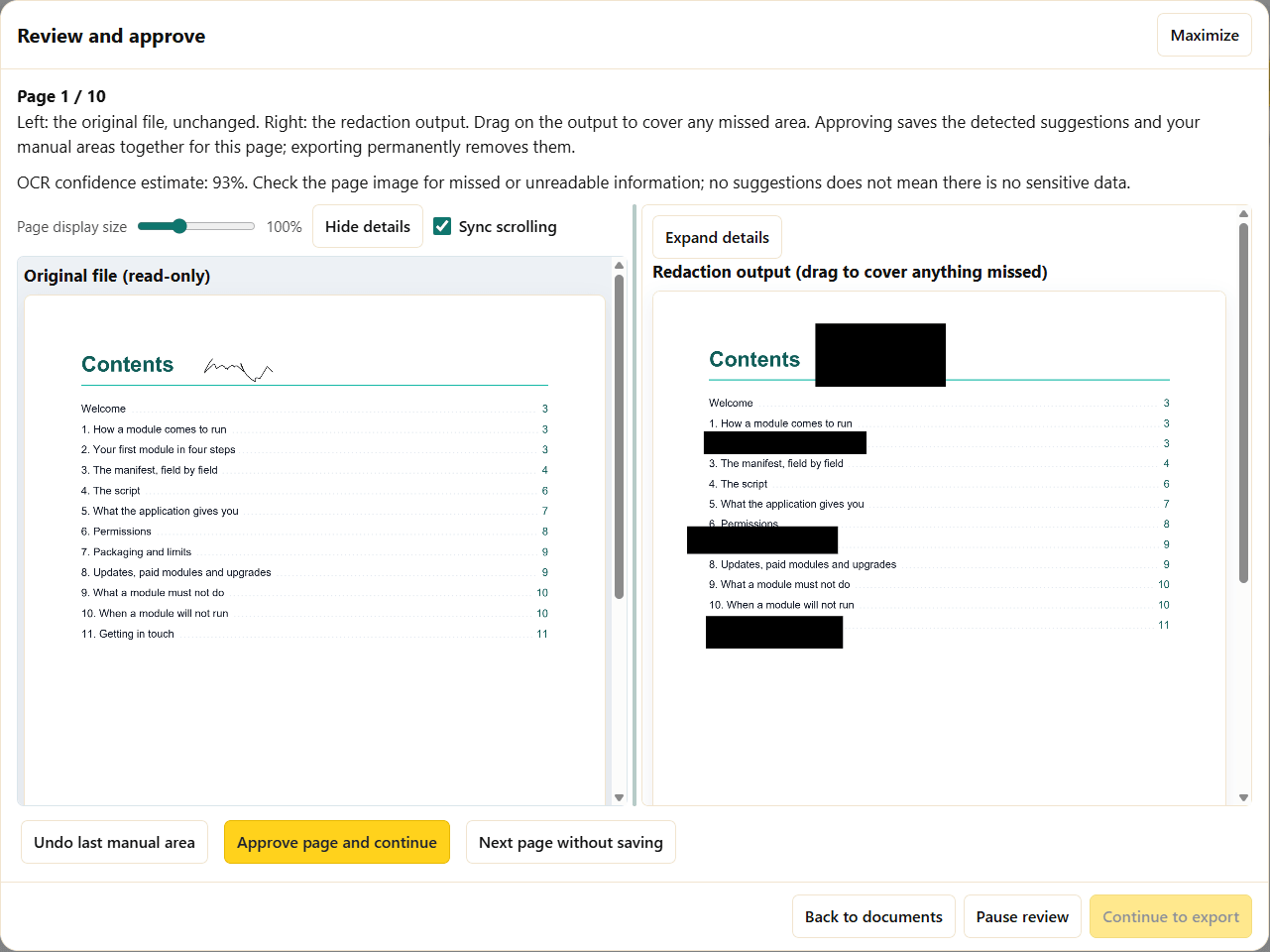
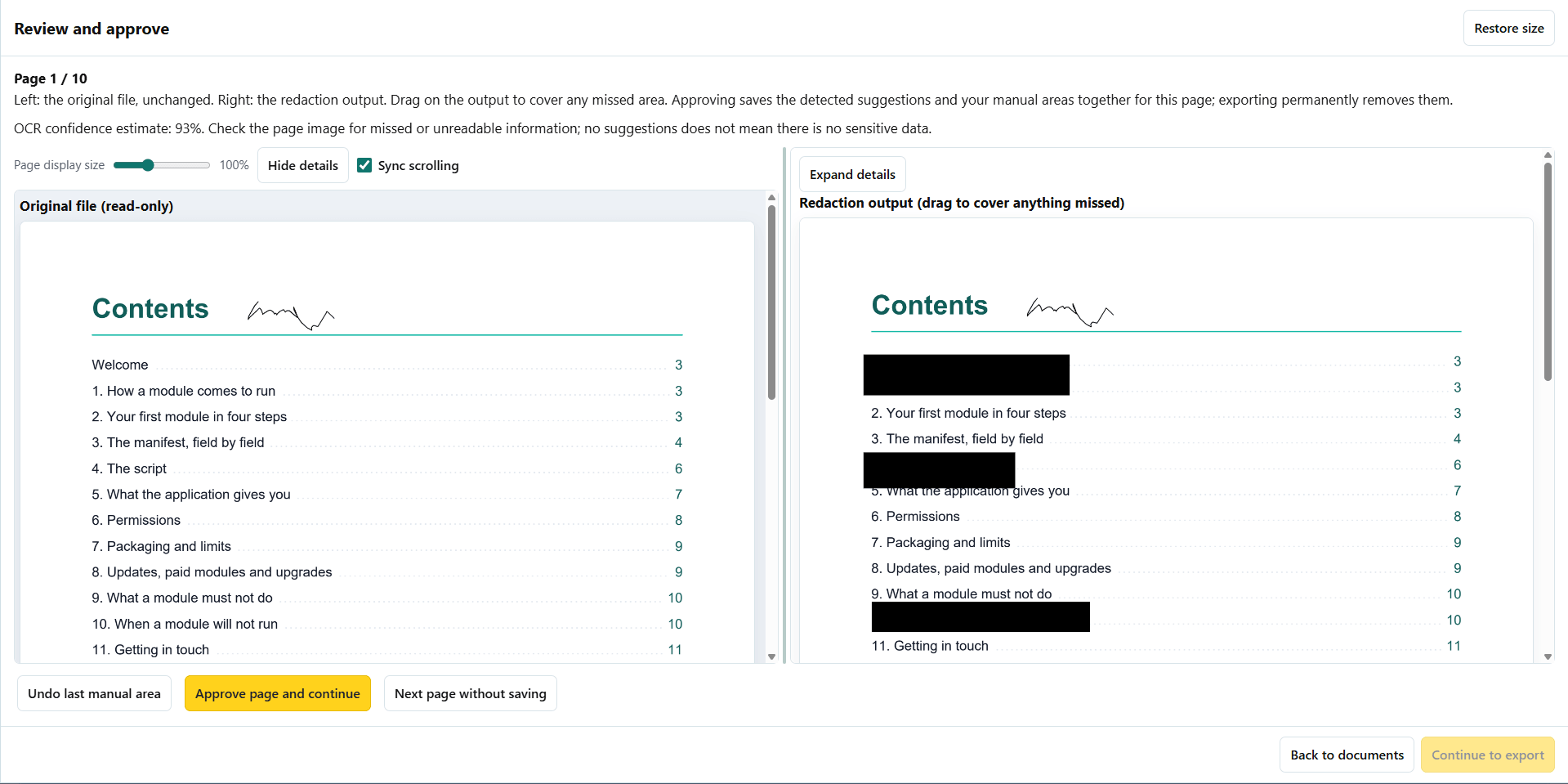
- Original page on the left, redacted result on the right: drag to cover anything missed
- Image-only output with nothing hidden underneath, plus a verification report
Specifications: PDF, JPEG, PNG and TIFF · 1,024 MB per file and per batch · up to 1,000 files · 20,000 pages per file · output: image-only PDF and JSON report
US$99 one-time or US$39 / year · 3-day free trial
Best for: Law firms, HR, records and freedom-of-information requests, healthcare, insurance and financial administration.
OCR & Document Capture
Turn scans and page photos into searchable PDFs, editable Word, Excel and Rich Text documents, or EPUB e-books, a whole batch at a time.
- English, French and Spanish, fully offline
- Auto Batch: compile a book or a folder of page photos into one Word document, with searchable PDF or EPUB as extras
- Photographed pages are straightened, dark edges trimmed and two-page spreads split automatically
- Pages with low confidence are flagged for you to check
- Export a finished batch again in another format without processing it again
Specifications: PDF, JPEG, PNG and TIFF · 1,024 MB per file and per batch · Auto Batch: up to 1,000 files, folders and subfolders · output: searchable PDF, .docx, .xlsx, .rtf, .epub
US$79 one-time or US$29 / year · 3-day free trial
Best for: Digitizing books, manuals, archives and paper records; schools, libraries, researchers and authors.
Legal Document Production
Number a whole production set with consecutive Bates identifiers and a production index, without covering anything on the page.
- Your prefix and starting number, continued across every file in the batch
- Labels go in a footer added below the original page area, so no content is covered
- CSV production index with each document’s range
- Every page’s label is read back from the output before it is saved
Specifications: PDF only · 100 MB and 2,000 pages per PDF · 1,024 MB per batch · output: numbered PDFs and CSV index
US$59 one-time or US$24 / year · 3-day free trial
Best for: Law firms, litigation support, in-house legal and compliance teams.
Forms Automation
Fill one PDF form for every row of a spreadsheet (CSV) and get finished, flattened PDFs.
- Up to 1,000 records per batch
- Text, checkbox, dropdown, list and radio fields; match columns to fields by name or with a mapping
- Each record is checked on its own, so one bad row never blocks the rest
- Exception index listing every record that needs attention
Specifications: One AcroForm template (25 MB, 100 pages, 1,000 fields) · CSV up to 2 MB, 1,000 records, 100 columns · XFA and signature fields not supported
US$49 one-time or US$19 / year · 3-day free trial
Best for: HR onboarding, applications, certificates, enrolment and other repeated paperwork.
Data Extraction
Read labelled values, such as invoice numbers, dates and totals, from many PDFs and scans into one spreadsheet you can trust.
- Define up to 30 fields once, as name = printed label
- Works on scanned PDFs and images, read with local OCR
- Correct any value during review; your approved values are what is exported
- One CSV row per document, with spreadsheet formulas neutralized for safety
Specifications: PDF and images · 1,024 MB per batch · up to 30 labelled fields · output: CSV
US$59 one-time or US$24 / year · 3-day free trial
Best for: Accounts payable, bookkeeping, claims and records processing.
Document Sanitization
Rebuild documents as clean, image-only PDFs that look the same but carry nothing hidden.
- Leaves out metadata, hidden text, attachments, scripts and form objects
- Every page is compared with the original before it is saved
- Whole batches at a time, with a report for each document
Specifications: PDF and images · 1,024 MB per file and per batch · output: fresh image-only PDFs (not searchable)
US$39 one-time or US$15 / year · 3-day free trial
Best for: Anyone sending documents outside the organization, publishing them, or handing them to third parties.
See it in action: Commercial Redaction
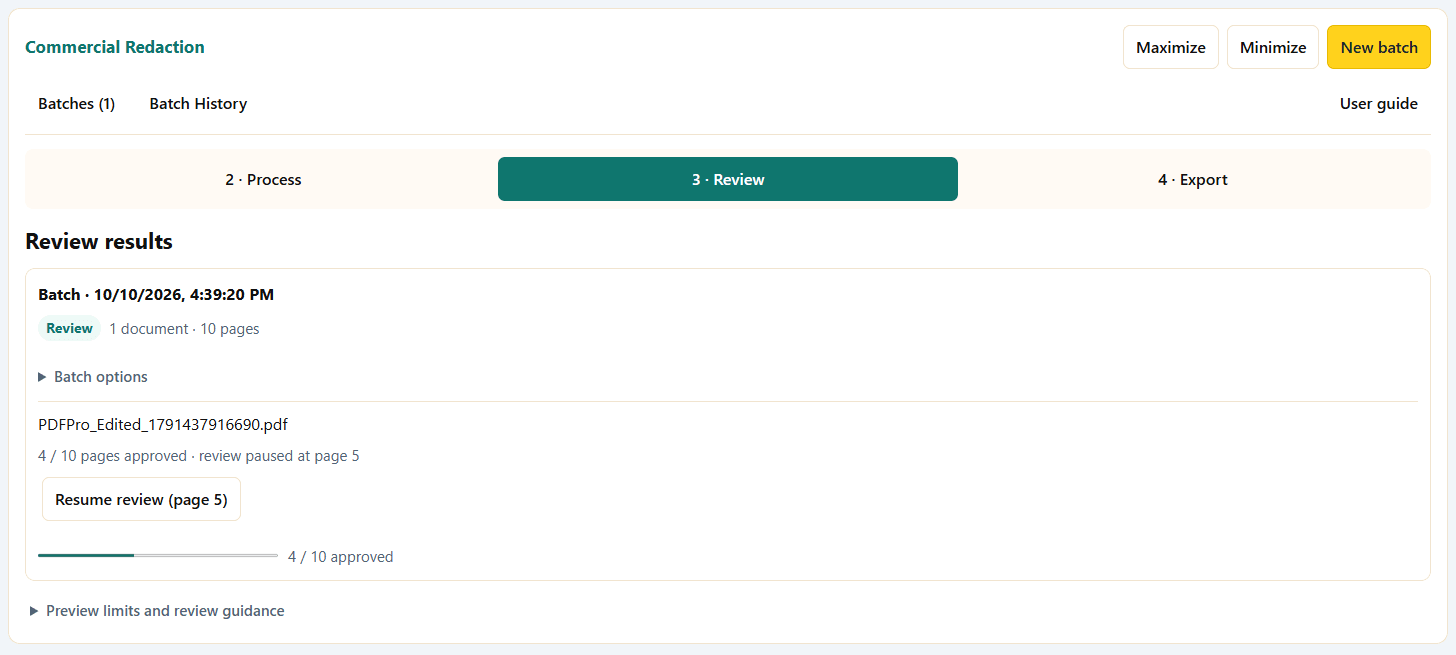
Screens from Commercial Redaction. The sample page is a table of contents with redaction areas applied.
Built-in tool or add-on?
Every desktop licence includes a related built-in tool for single documents. Each add-on is built for batches, review and records.
| Job | Included with the desktop app | Add-on |
|---|---|---|
| How you work | Choose one document, set options, get the result straight away. | Queue a batch, let it run in the background, review every page side by side, then export verified files with a report. Pause, resume and crash recovery throughout. |
| Redaction | Redact PDF: one PDF at a time. Blacks out a word or phrase, a regular expression, or social security, email, phone and card patterns found in the PDF’s text, or a fixed band at the top, middle or bottom of every page. Pages are rebuilt from pixels. | Commercial Redaction: whole batches, including scans and photos read with OCR. 50 industry profiles, 8 regions with check-digit validation, labelled names, addresses and birth dates. Every page reviewed with the original beside the result, extra areas drawn by hand, and a verification report. |
| OCR | Document OCR: one PDF, PNG or JPEG in English. Text to copy or save, and a searchable PDF. | OCR & Document Capture: batches including TIFF, in English, French and Spanish. Word, Excel, Rich Text, EPUB and searchable PDF. Doubtful pages flagged for review. Auto Batch compiles a book from page photos, straightening pages and splitting spreads. |
| Bates numbering | Bates Stamping & Indexing: one PDF. Prefix, suffix, start number, padding, position, size and colour, stamped on the page. | Legal Document Production: numbering continues across a whole batch. The label goes in a footer added below the page, so nothing is covered. CSV production index, and every label is read back to verify. |
| Forms | Fill & Flatten PDF Forms: fill one form by hand, then flatten it if you wish. | Forms Automation: one flattened PDF per spreadsheet row, up to 1,000 records, each checked on its own, with an exception index. |
| Data to spreadsheet | PDF to Excel: tables from a PDF into a spreadsheet. | Data Extraction: up to 30 labelled fields read from many PDFs and scans into one CSV, one row per document, corrected and approved by you. |
| Cleaning before sharing | Metadata Deep Clean & Inspector: removes document properties and XMP metadata from one PDF. The page content stays as it is. | Document Sanitization: rebuilds every page as a fresh image-only PDF, leaving out metadata, hidden text, attachments, scripts and form objects, and checks each page against the original. |
Nothing is taken away. Built-in tools stay included with your desktop licence whether or not you buy an add-on, and an add-on never changes how they work.
Included in every add-on
- On-device processing: no uploads and no cloud OCR. Processing works offline.
- Encrypted workspace: page images, recognized text, review progress and job checkpoints are stored encrypted (AES-256-GCM), with the key protected by your operating system.
- Side-by-side review with mandatory page approval, plus Pause review and Resume review for long jobs.
- Crash-safe recovery: interrupted jobs come back paused; finished pages and saved files are never redone.
- Verified exports: outputs are checked before they are published, never replace an existing file, and come with a
.report.jsonverification report. Originals are never modified. - Batch History with Clear batch, Clear all history and Remove private job data, which delete the encrypted cache but never your originals or exported files.
- Built-in user guide for every workflow, available from the add-on workspace.
Requirements
- App: PDF Pro Panel 3 desktop, version 1.15.7 or later, on Windows 10 or 11, or macOS 13 Ventura or later. Add-ons are not available in the mobile or web apps.
- Licence: an active, purchased desktop licence (direct editions), or the Microsoft Store or Mac App Store edition.
- Secure storage: your operating system’s encryption must be available; private job data is never written unencrypted.
- Disk space: a 256 MB free-space reserve plus room for the job’s encrypted cache (up to 8 GB per job).
- Processor: OCR speed depends mostly on the CPU. On a low-power 4-core Intel Celeron N5095A a full text page took roughly 12–18 seconds; faster processors take proportionally less.
- Internet: needed only to buy, install and update add-ons and for periodic licence verification, never for processing.
Licence
- One purchase, one add-on: each purchase unlocks only that add-on. It does not include a desktop licence and does not unlock other add-ons.
- Linked to your desktop licence: direct-edition add-ons are bought with the same website account as your desktop licence and restored in the app with Restore purchases.
- Computers: an add-on can be used on the computers your desktop licence allows.
- Offline use: follows your desktop licence’s offline verification period; the app needs to go online from time to time to confirm the licence.
- Signed delivery: direct editions download add-ons as signed packages. The app checks the signature, version, compatibility, size and fingerprint before installing. Some updates may require a newer app version.
- Store editions: add-ons are bought with your Microsoft Store or Mac App Store account and arrive with Store app updates. Purchases do not transfer between the website and Store editions, or between the two Stores.
- Privacy: licence checks send device and licence identifiers only, never document contents.
Read the full extension purchase terms and the licence agreement.
Price
Buy each add-on on its own, as a one-time purchase you keep or a yearly subscription, both with unlimited processing, or get all six as a bundle. Every add-on includes a 3-day free trial. Prices are in US dollars (USD), before any applicable taxes, and are always shown again before checkout. Add-ons can be bought from launch.
| Add-on | One-time purchase | Yearly subscription | Free trial |
|---|---|---|---|
| Commercial Redaction | US$99 | US$39 / year | 3 days |
| OCR & Document Capture | US$79 | US$29 / year | 3 days |
| Legal Document Production | US$59 | US$24 / year | 3 days |
| Forms Automation | US$49 | US$19 / year | 3 days |
| Data Extraction | US$59 | US$24 / year | 3 days |
| Document Sanitization | US$39 | US$15 / year | 3 days |
| All six add-ons (bundle) | US$249 instead of US$384 | US$99 / year instead of US$150 / year | 3 days |
Add-ons need PDF Pro Panel 3 desktop. See current desktop pricing for the base app. Buying for a team or organization? Email support@pdfpropanel.com.
Free trial and refunds
- 3-day free trial of every add-on: at launch, each add-on can be tried free for 3 days, once per add-on, so you can test it on your own documents before you buy.
- The desktop app has its own 14-day free trial, which covers the built-in tools.
- 30-day money-back guarantee: direct purchases are covered by our refund policy. A refunded add-on stops working at the next licence verification. Your documents and exported files are never deleted.
- Store editions follow the Microsoft Store or Mac App Store refund rules.
How to get add-ons (at launch)
- Install PDF Pro Panel 3 desktop and activate your licence.
- Open Extensions from the app’s settings menu, or from the Module Manager.
- Choose Buy extension and pay on our website with the same account as your desktop licence.
- Choose Restore purchases, then Install. The signed package is checked before it is installed, and the add-on appears with your tools.
In the Microsoft Store and Mac App Store editions, buy and restore add-ons in the same Extensions dialog using your Store account.
Frequently asked questions
Do I need PDF Pro Panel 3 to use an add-on?
Yes. Add-ons extend the PDF Pro Panel 3 desktop app for Windows and macOS (version 1.15.7 or later) and need an active desktop licence. They do not run in the mobile or web apps.
Can I try an add-on before I buy it?
Yes. At launch every add-on includes a 3-day free trial, once per add-on, so you can test it on your own documents. It is separate from the desktop app’s 14-day trial, which covers the built-in tools.
Is there a limit on how much I can process?
No usage limit: there are no per-page fees, quotas or monthly caps. Each batch holds up to 1,000 files and 1 GB (per-file limits depend on the add-on), and you can run as many batches as you need.
Do I have to buy all six?
No. Each add-on is bought separately and unlocks only its own workflow. If you need most of them, the bundle of all six costs less than buying them one by one.
Is it a subscription or a one-time purchase?
Your choice, for each add-on: a one-time purchase or a yearly subscription, both with unlimited processing. Launch prices range from US$39 to US$99 one-time, or US$15 to US$39 a year; all six together are US$249 one-time or US$99 a year. See Price.
Does buying an add-on unlock the base app or other add-ons?
No. An add-on purchase does not include a desktop licence and does not unlock any other add-on.
On how many computers can I use an add-on?
On the computers your desktop licence allows. Add-on purchases follow the device allowance of the licence they are linked to.
Do my documents leave my computer?
No. All processing happens on your device. Licence checks send device and licence identifiers only, never document contents.
Do add-ons work offline?
Yes, processing is fully offline. The app needs to go online from time to time to verify your licence, following the desktop licence’s offline period.
Will the built-in tools change if I do not buy an add-on?
No. Redact PDF, Document OCR, Bates Stamping, form filling, PDF to Excel and the metadata cleaner stay included with your desktop licence.
I bought the app from the Microsoft Store or Mac App Store. Can I buy add-ons on the website?
Store editions use Store purchases; website purchases do not unlock them. Purchases do not transfer between the website and Store editions, or between the two Stores.
Can I review a very long document over several days?
Yes. Choose Pause review, and Resume review later continues at the page where you stopped, keeping your approvals and unsaved choices. Nothing is processed again.
What happens if my computer shuts down in the middle of a job?
The job is recovered as paused. Resume it and only the remaining work is done; finished pages and saved files are kept.
Which languages are supported?
OCR reads English, French and Spanish, in any combination. The add-on screens are currently in English.
Are the results certified for legal or privacy compliance?
No. The add-ons help people work faster and more consistently, and each page is approved by a reviewer. Verification reports record what was checked; they are not a certification.
What happens if I ask for a refund?
Direct purchases can be refunded within 30 days under our refund policy. The add-on stops working at the next licence verification. Your documents and the files you exported are not deleted.
When will add-ons be available?
A launch date has not been announced. Email us to be told when they are released, or to tell us which workflows, languages or regions matter to you.
Interested in add-ons?
Tell us which workflows you need, and we will let you know when they launch.